Oxyile app
Get the app
On a computer? Open this page on your phone.
Test mode: no real money moves on Oxyile yet.
Android
Version 1.0.0 · 1 MB · Android 7 or newer
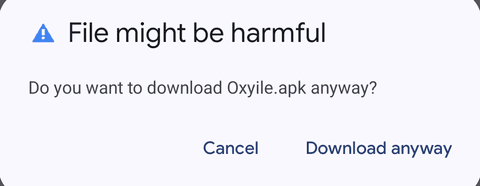
- Tap Download for Android. Because the app isn't from the Play Store, your browser may say "File might be harmful". If it does, tap Download anyway.
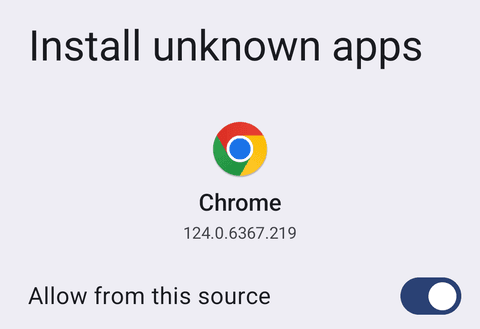
- Tap Open when it finishes. The first time, your phone asks for permission: tap Settings, turn on Allow from this source, then go back. If the install doesn't start, tap Open again.
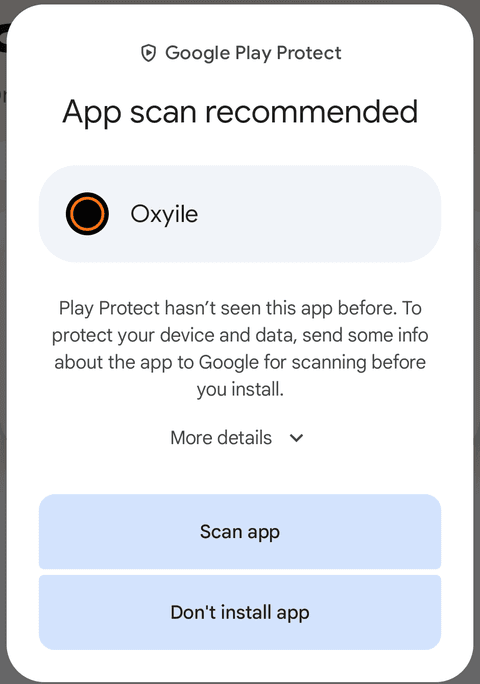
- Google Play Protect may say "App scan recommended" because the app is new. Tap Scan app.
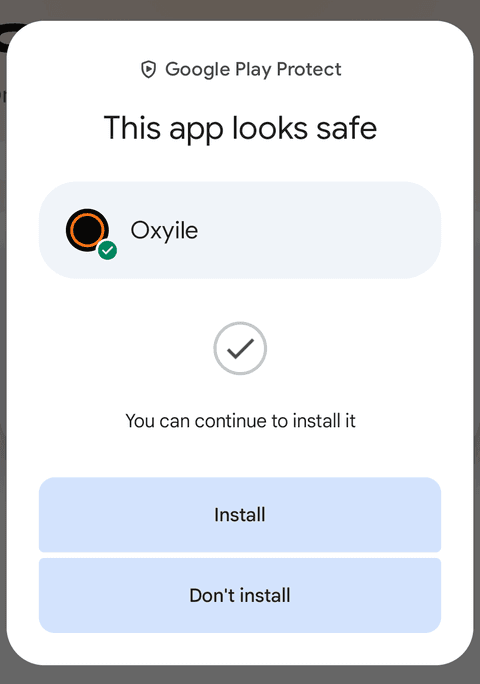
- When it says the app looks safe, tap Install, then Open.
- Turn the permission back off: Settings, Apps, Special app access, Install unknown apps, then your browser. The Oxyile app keeps working.
Stay safe: only download Oxyile from www.oxyile.com. We will never send you the app by email, text or WhatsApp, or ask you to install anything else. If someone does, tell us at hello@oxyile.com.
Check the file (optional)
SHA-256 fingerprint of this version:
def2077bd198dbbbfcb908270498158227f2b7959ddc7d894560fb54bd3f2719
iPhone and iPad
Apple only allows iPhone apps through its App Store, and Oxyile isn't on it yet. For now, you can add Oxyile to your Home Screen, and it opens full screen like an app.
- Open www.oxyile.com in Safari.
- Tap the Share button.
- Tap Add to Home Screen.
Updates
You don't need to do anything. When we improve Oxyile, you get it the next time you open the app. In the rare case the app itself needs a new version, it will show a message.